
Why Choose Vitest Over Jest for Vite Projects?
When you’re using Vite as your build tool, Vitest offers compelling advantages over Jest:
Performance Benefits
- 10-20x faster in watch mode compared to Jest
- Instant Hot Module Replacement (HMR) leveraging Vite’s speed
- Native ESM support without additional configuration
Seamless Integration
- Shared configuration with your Vite development setup
- Same plugin ecosystem as your main application
- Zero-config setup for most Vite projects
Modern Features
- Built-in TypeScript support without extra setup
- Native JSX support out of the box
- Jest-compatible API for easy migration
The key advantage is eliminating the complexity of maintaining two different pipelines - one for development (Vite) and another for testing (Jest with complex transforms).
Project Setup and Folder Structure
Initial Setup
First, create a new React project with Vite:
npm create vite@latest my-react-app -- --template react-ts
cd my-react-app
Install Testing Dependencies
npm install -D vitest @testing-library/react @testing-library/jest-dom @testing-library/user-event jsdom axios
npm install --save-dev vite-tsconfig-paths
npm install
Package Breakdown:
vitest: The testing framework@testing-library/react: React component testing utilities@testing-library/jest-dom: Custom DOM matchers@testing-library/user-event: User interaction simulationjsdom: DOM environment for tests
Configuration Files
1. Vitest Configuration (vitest.config.ts)
/// <reference types="vitest" />
import { defineConfig } from 'vitest/config'
import react from '@vitejs/plugin-react'
import tsconfigPaths from 'vite-tsconfig-paths'

export default defineConfig({
  plugins: [react(), tsconfigPaths()],
  test: {
    environment: 'jsdom',
    setupFiles: ['./src/test/setup.ts'],
    globals: true,
    css: false, // Speeds up tests by skipping CSS processing
    include: ['src/**/*.{test,spec}.{js,mjs,cjs,ts,mts,cts,jsx,tsx}'],
  },
})
2. Typescript declaration file (src/test/vitest.d.ts)
/// <reference types="@testing-library/jest-dom" />

import type { TestingLibraryMatchers } from '@testing-library/jest-dom/matchers'

declare module 'vitest' {
  interface Assertion<T = any> extends TestingLibraryMatchers<T, void> {}
}
3. Test Setup File (src/test/setup.ts)
import { expect, afterEach } from 'vitest'
import { cleanup } from '@testing-library/react'
import * as matchers from '@testing-library/jest-dom/matchers'

// Extend Vitest's expect with jest-dom matchers
expect.extend(matchers)

// Cleanup after each test
afterEach(() => {
  cleanup()
})
4. Package.json Scripts
{
  "scripts": {
    "test": "vitest",
    "test:ui": "vitest --ui",
    "test:coverage": "vitest --coverage"
  }
}
Recommended Folder Structure
src/
├── components/
│   ├── Button/
│   │   ├── Button.tsx
│   │   ├── Button.test.tsx
│   │   └── index.ts
│   └── TodoList/
│       ├── TodoList.tsx
│       ├── TodoList.test.tsx
│       └── index.ts
├── hooks/
│   ├── useCounter.ts
│   └── useCounter.test.ts
├── utils/
│   ├── helpers.ts
│   └── helpers.test.ts
└── test/
    ├── setup.ts
    └── __mocks__/
        └── api.ts
Key Principles:
- Co-location: Keep test files next to their source files
- Consistent naming: Use
.test.tsxor.spec.tsxsuffixes - Feature-based organization: Group related functionality together
Step-by-Step Testing Examples
1. Basic Component Testing
Let’s start with a simple Button component:
// src/components/Button/Button.tsx
interface ButtonProps {
  children: React.ReactNode;
  onClick?: () => void;
  variant?: 'primary' | 'secondary';
  disabled?: boolean;
}

export const Button: React.FC<ButtonProps> = ({
  children,
  onClick,
  variant = 'primary',
  disabled = false
}) => {
  return (
    <button
      className={`btn btn-${variant}`}
      onClick={onClick}
      disabled={disabled}
      data-testid="button"
    >
      {children}
    </button>
  );
};
Test File:
// src/components/Button/Button.test.tsx
import { describe, it, expect, vi } from 'vitest'
import { render, screen } from '@testing-library/react'
import { userEvent } from '@testing-library/user-event'
import { Button } from './Button'

describe('Button Component', () => {
  it('renders with correct text', () => {
    render(<Button>Click me</Button>)

    expect(screen.getByRole('button', { name: /click me/i })).toBeInTheDocument()
  })

  it('applies correct CSS class for variant', () => {
    render(<Button variant="secondary">Secondary Button</Button>)

    const button = screen.getByRole('button')
    expect(button).toHaveClass('btn-secondary')
  })

  it('handles click events', async () => {
    const user = userEvent.setup()
    const handleClick = vi.fn()

    render(<Button onClick={handleClick}>Clickable</Button>)

    const button = screen.getByRole('button')
    await user.click(button)

    expect(handleClick).toHaveBeenCalledOnce()
  })

  it('is disabled when disabled prop is true', () => {
    render(<Button disabled>Disabled Button</Button>)

    const button = screen.getByRole('button')
    expect(button).toBeDisabled()
  })
})
2. Testing Components with State
// src/components/Counter/Counter.tsx
import { useState } from 'react'

export const Counter: React.FC = () => {
  const [count, setCount] = useState(0)

  return (
    <div>
      <p data-testid="count">Count: {count}</p>
      <button onClick={() => setCount(count + 1)}>
        Increment
      </button>
      <button onClick={() => setCount(count - 1)}>
        Decrement
      </button>
      <button onClick={() => setCount(0)}>
        Reset
      </button>
    </div>
  )
}
Test File:
// src/components/Counter/Counter.test.tsx
import { describe, it, expect } from 'vitest'
import { render, screen } from '@testing-library/react'
import { userEvent } from '@testing-library/user-event'
import { Counter } from './Counter'

describe('Counter Component', () => {
  it('starts with count of 0', () => {
    render(<Counter />)

    expect(screen.getByTestId('count')).toHaveTextContent('Count: 0')
  })

  it('increments count when increment button is clicked', async () => {
    const user = userEvent.setup()
    render(<Counter />)

    const incrementButton = screen.getByRole('button', { name: /increment/i })
    await user.click(incrementButton)

    expect(screen.getByTestId('count')).toHaveTextContent('Count: 1')
  })

  it('decrements count when decrement button is clicked', async () => {
    const user = userEvent.setup()
    render(<Counter />)

    // First increment to have a positive number
    const incrementButton = screen.getByRole('button', { name: /increment/i })
    await user.click(incrementButton)

    const decrementButton = screen.getByRole('button', { name: /decrement/i })
    await user.click(decrementButton)

    expect(screen.getByTestId('count')).toHaveTextContent('Count: 0')
  })

  it('resets count to 0 when reset button is clicked', async () => {
    const user = userEvent.setup()
    render(<Counter />)

    // Increment a few times
    const incrementButton = screen.getByRole('button', { name: /increment/i })
    await user.click(incrementButton)
    await user.click(incrementButton)

    const resetButton = screen.getByRole('button', { name: /reset/i })
    await user.click(resetButton)

    expect(screen.getByTestId('count')).toHaveTextContent('Count: 0')
  })
})
3. Testing Custom Hooks
// src/hooks/useCounter.ts
import { useState, useCallback } from 'react'

export const useCounter = (initialValue = 0) => {
  const [count, setCount] = useState(initialValue)

  const increment = useCallback(() => {
    setCount(prev => prev + 1)
  }, [])

  const decrement = useCallback(() => {
    setCount(prev => prev - 1)
  }, [])

  const reset = useCallback(() => {
    setCount(initialValue)
  }, [initialValue])

  return { count, increment, decrement, reset }
}
Test File:
// src/hooks/useCounter.test.ts
import { describe, it, expect } from 'vitest'
import { renderHook, act } from '@testing-library/react'
import { useCounter } from './useCounter'

describe('useCounter Hook', () => {
  it('initializes with default value of 0', () => {
    const { result } = renderHook(() => useCounter())

    expect(result.current.count).toBe(0)
  })

  it('initializes with custom initial value', () => {
    const { result } = renderHook(() => useCounter(5))

    expect(result.current.count).toBe(5)
  })

  it('increments count', () => {
    const { result } = renderHook(() => useCounter())

    act(() => {
      result.current.increment()
    })

    expect(result.current.count).toBe(1)
  })

  it('decrements count', () => {
    const { result } = renderHook(() => useCounter(5))

    act(() => {
      result.current.decrement()
    })

    expect(result.current.count).toBe(4)
  })

  it('resets count to initial value', () => {
    const { result } = renderHook(() => useCounter(10))

    // Change the count
    act(() => {
      result.current.increment()
      result.current.increment()
    })

    expect(result.current.count).toBe(12)

    // Reset
    act(() => {
      result.current.reset()
    })

    expect(result.current.count).toBe(10)
  })
})
4. Testing Asynchronous Operations
// src/hooks/useFetch.ts
import { useState, useEffect } from 'react'

interface FetchState<T> {
  data: T | null
  loading: boolean
  error: Error | null
}

export const useFetch = <T>(url: string): FetchState<T> => {
  const [state, setState] = useState<FetchState<T>>({
    data: null,
    loading: true,
    error: null,
  })

  useEffect(() => {
    const fetchData = async () => {
      try {
        setState(prev => ({ ...prev, loading: true, error: null }))
        const response = await fetch(url)

        if (!response.ok) {
          throw new Error(`HTTP error! status: ${response.status}`)
        }

        const data = await response.json()
        setState({ data, loading: false, error: null })
      } catch (error) {
        setState({
          data: null,
          loading: false,
          error: error instanceof Error ? error : new Error('An error occurred'),
        })
      }
    }

    fetchData()
  }, [url])

  return state
}
Test File:
// src/hooks/useFetch.test.ts
import { describe, it, expect, vi, beforeEach, afterEach } from 'vitest'
import { renderHook, waitFor } from '@testing-library/react'
import { useFetch } from './useFetch'

// Mock fetch globally
window.fetch = vi.fn()

describe('useFetch Hook', () => {
  beforeEach(() => {
    vi.clearAllMocks()
  })

  afterEach(() => {
    vi.restoreAllMocks()
  })

  it('starts with loading state', () => {
    vi.mocked(fetch).mockResolvedValue({
      ok: true,
      json: async () => ({ id: 1, name: 'Test' }),
    } as Response)

    const { result } = renderHook(() => useFetch('/api/test'))

    expect(result.current.loading).toBe(true)
    expect(result.current.data).toBeNull()
    expect(result.current.error).toBeNull()
  })

  it('fetches data successfully', async () => {
    const mockData = { id: 1, name: 'Test User' }

    vi.mocked(fetch).mockResolvedValue({
      ok: true,
      json: async () => mockData,
    } as Response)

    const { result } = renderHook(() => useFetch('/api/users/1'))

    await waitFor(() => {
      expect(result.current.loading).toBe(false)
    })

    expect(result.current.data).toEqual(mockData)
    expect(result.current.error).toBeNull()
    expect(fetch).toHaveBeenCalledWith('/api/users/1')
  })

  it('handles fetch errors', async () => {
    vi.mocked(fetch).mockResolvedValue({
      ok: false,
      status: 404,
    } as Response)

    const { result } = renderHook(() => useFetch('/api/not-found'))

    await waitFor(() => {
      expect(result.current.loading).toBe(false)
    })

    expect(result.current.data).toBeNull()
    expect(result.current.error).toBeInstanceOf(Error)
    expect(result.current.error?.message).toBe('HTTP error! status: 404')
  })

  it('handles network errors', async () => {
    const networkError = new Error('Network error')
    vi.mocked(fetch).mockRejectedValue(networkError)

    const { result } = renderHook(() => useFetch('/api/test'))

    await waitFor(() => {
      expect(result.current.loading).toBe(false)
    })

    expect(result.current.data).toBeNull()
    expect(result.current.error).toEqual(networkError)
  })
})
Mocking in Vitest
1. Function Mocking
// src/utils/api.ts
export const fetchUser = async (id: string) => {
  const response = await fetch(`/api/users/${id}`)
  return response.json()
}

export const createUser = async (userData: any) => {
  const response = await fetch('/api/users', {
    method: 'POST',
    headers: { 'Content-Type': 'application/json' },
    body: JSON.stringify(userData),
  })
  return response.json()
}
Test with Mocking:
// src/utils/api.test.ts
import { describe, it, expect, vi, beforeEach } from 'vitest'
import { fetchUser, createUser } from './api'

// Mock fetch at the module level
window.fetch = vi.fn()

describe('API Utils', () => {
  beforeEach(() => {
    vi.clearAllMocks()
  })

  describe('fetchUser', () => {
    it('fetches user data correctly', async () => {
      const mockUser = { id: '1', name: 'John Doe' }

      vi.mocked(fetch).mockResolvedValueOnce({
        ok: true,
        json: async () => mockUser,
      } as Response)

      const result = await fetchUser('1')

      expect(result).toEqual(mockUser)
      expect(fetch).toHaveBeenCalledWith('/api/users/1')
    })
  })

  describe('createUser', () => {
    it('creates user successfully', async () => {
      const userData = { name: 'Jane Doe', email: 'jane@example.com' }
      const mockResponse = { id: '2', ...userData }

      vi.mocked(fetch).mockResolvedValueOnce({
        ok: true,
        json: async () => mockResponse,
      } as Response)

      const result = await createUser(userData)

      expect(result).toEqual(mockResponse)
      expect(fetch).toHaveBeenCalledWith('/api/users', {
        method: 'POST',
        headers: { 'Content-Type': 'application/json' },
        body: JSON.stringify(userData),
      })
    })
  })
})
2. Module Mocking
// src/test/__mocks__/axios.ts
import { vi } from 'vitest'

const mockAxios = {
  get: vi.fn(() => Promise.resolve({ data: {} })),
  post: vi.fn(() => Promise.resolve({ data: {} })),
  put: vi.fn(() => Promise.resolve({ data: {} })),
  delete: vi.fn(() => Promise.resolve({ data: {} })),
}

export default mockAxios
Using the Mock:
// src/services/userService.ts
import axios from 'axios'

export interface User {
  id: number
  name: string
}

export class UserService {
  static async getUsers(): Promise<User[]> {
    const response = await axios.get<User[]>('/api/users')
    return response.data
  }
}
Test file:
// src/services/userService.test.ts
import { describe, it, expect, vi } from 'vitest'
import axios from 'axios'
import { UserService } from './userService'

vi.mock('axios')

describe('UserService', () => {
  it('fetches users', async () => {
    const mockUsers = [{ id: 1, name: 'John' }]

    vi.mocked(axios.get).mockResolvedValue({ data: mockUsers })

    const users = await UserService.getUsers()

    expect(users).toEqual(mockUsers)
    expect(axios.get).toHaveBeenCalledWith('/api/users')
  })
})
3. Partial Mocking
// src/utils/dateUtils.ts
export const formatDate = (date: Date): string => {
  const year = date.getFullYear()
  const month = String(date.getMonth() + 1).padStart(2, '0')
  const day = String(date.getDate()).padStart(2, '0')
  return `${year}-${month}-${day}`
}

export const isToday = (date: Date): boolean => {
  const today = new Date()
  return formatDate(date) === formatDate(today)
}
Test file:
// src/utils/dateUtils.test.ts
import { describe, it, expect, vi, beforeEach, afterEach } from 'vitest'
import { formatDate, isToday } from './dateUtils'

describe('Date Utils', () => {
  beforeEach(() => {
    vi.useFakeTimers()
  })

  afterEach(() => {
    vi.useRealTimers()
  })

  it('formats date correctly', () => {
    const testDate = new Date('2023-12-25')
    vi.setSystemTime(testDate)

    const result = formatDate(testDate)
    expect(result).toBe('2023-12-25')
  })

  it('checks if date is today', () => {
    const today = new Date('2023-06-15')
    vi.setSystemTime(today)

    expect(isToday(new Date('2023-06-15'))).toBe(true)
    expect(isToday(new Date('2023-06-14'))).toBe(false)
  })
})
Common Pitfalls and Best Practices
Common Pitfalls
- Not Cleaning Up Mocks
// ❌ Bad: Mocks persist between tests
describe('Tests', () => {
  it('test 1', () => {
    vi.mock('./module')
    // ... test logic
  })

  it('test 2', () => {
    // Previous mock still active!
  })
})

// ✅ Good: Clean up mocks
describe('Tests', () => {
  afterEach(() => {
    vi.clearAllMocks()
    vi.resetAllMocks()
  })
})- Testing Implementation Details
// ❌ Bad: Testing internal state
expect(component.state.count).toBe(1)

// ✅ Good: Testing behavior
expect(screen.getByText('Count: 1')).toBeInTheDocument()- Overly Complex Test Setup
// ❌ Bad: Too much setup obscures the test intent
// ✅ Good: Keep tests simple and focused
it('increments counter', async () => {
  render(<Counter />)
  await user.click(screen.getByRole('button', { name: /increment/i }))
  expect(screen.getByText('1')).toBeInTheDocument()
})
Best Practices
- Use Descriptive Test Names
// ✅ Good: Clear, descriptive names
describe('UserProfile Component', () => {
  it('displays user name and email when user data is provided', () => {
    // Test implementation
  })

  it('shows loading spinner while fetching user data', () => {
    // Test implementation
  })

  it('renders error message when user fetch fails', () => {
    // Test implementation
  })
})- Follow the AAA Pattern
it('calculates total price correctly', () => {
  // Arrange
  const items = [
    { price: 10, quantity: 2 },
    { price: 15, quantity: 1 }
  ]

  // Act
  const total = calculateTotal(items)

  // Assert
  expect(total).toBe(35)
})- Use Role-Based Queries
// ✅ Good: Use accessible queries
expect(screen.getByRole('button', { name: /submit/i })).toBeInTheDocument()
expect(screen.getByRole('textbox', { name: /email/i })).toBeInTheDocument()

// ❌ Avoid: Using test IDs when role-based queries work
expect(screen.getByTestId('submit-button')).toBeInTheDocument()- Group Related Tests
describe('LoginForm', () => {
  describe('validation', () => {
    it('shows error for invalid email', () => {})
    it('shows error for short password', () => {})
  })

  describe('submission', () => {
    it('calls onSubmit with form data', () => {})
    it('shows loading state during submission', () => {})
  })
})- Test Edge Cases
describe('divide function', () => {
  it('divides positive numbers', () => {
    expect(divide(10, 2)).toBe(5)
  })

  it('handles division by zero', () => {
    expect(() => divide(10, 0)).toThrow('Division by zero')
  })

  it('handles negative numbers', () => {
    expect(divide(-10, 2)).toBe(-5)
  })

  it('handles decimal results', () => {
    expect(divide(1, 3)).toBeCloseTo(0.333, 3)
  })
})
Running Tests
Basic Commands
# Run all tests
npm run test

# Run specific test file
npx vitest Button.test.tsx

# Run tests matching pattern
npx vitest --grep "should render correctly"
Run tests with UI
#First you need to install the vitest/ui package
npm install @vitest/ui
npm run test:ui
Example:

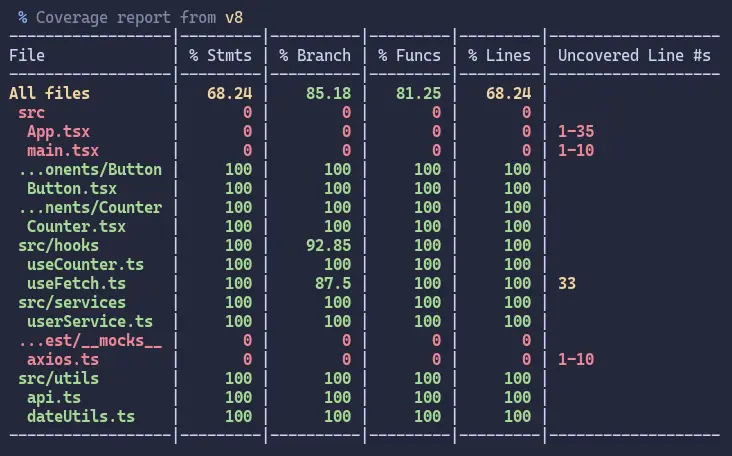
Run tests with coverage
#First you need to install the vitest/coverage-v8 package
npm install @vitest/coverage-v8
npm run test:coverage
Example:
Test Filtering
// Run only this test
it.only('should run only this test', () => {
  // Test implementation
})

// Skip this test
it.skip('should skip this test', () => {
  // Test implementation
})

// Todo: implement this test later
it.todo('should implement this feature')
This comprehensive tutorial provides you with everything needed to start testing React applications with Vitest. The combination of Vitest’s speed, Jest compatibility, and seamless Vite integration makes it an excellent choice for modern React development workflow.
Complete project source code: github.com/rtome85/vitest-tutorial
Tags
- Testing
- React
- Vitest
- Jest
Share this post
Related posts
Complete TanStack Router Tutorial: Building a Todo App
Learn TanStack Router from scratch by building a complete Todo application. This comprehensive tutorial covers type-safe routing, data loading, mutations, navigation patterns, and error handling with practical examples.
Building a To-Do List Web App with React and Zustand: A Complete Tutorial
This tutorial will guide you through building a modern To-Do List application using React and Zustand for state management. By the end, you'll have a fully functional app with add, toggle, delete, and persist functionality.